A maintenance technician starts work on a jammed conveyor belt. The machine is supposed to be locked out. A tag is in place—but it’s generic, handwritten, and offers no proof of who applied it or when. Minutes later, a supervisor resets the lock, assuming it was leftover from yesterday’s shift. The result: a near-miss incident that could have been fatal.
This scenario underscores a critical flaw in traditional lockout tagout (LOTO) programs—lack of verifiable accountability. Enter lockout tagout tags with photo: a simple yet transformative upgrade that turns a procedural formality into an enforceable safety checkpoint.
Photos on LOTO tags aren’t just a nice-to-have. They close a dangerous gap between policy and verification. When every lock is tied to a real person’s image, responsibility becomes visible, tampering becomes harder, and compliance becomes auditable.
Let’s break down why photo-integrated LOTO tags matter, how they work in real environments, and what to look for when implementing them.
The Accountability Gap in Standard Lockout Procedures
Standard LOTO tags typically include: - Name of the authorized employee - Department or shift - Date and time of lock application - Reason for lockout
But in fast-paced industrial settings, these fields are often incomplete, illegible, or falsified. A 2022 NIOSH report found that over 60% of LOTO violations involved missing or unverifiable personnel information. Handwritten tags degrade. Names get misspelled. Shift overlaps cause confusion.
Without proof of identity, a lock becomes just another piece of hardware—easy to ignore or override.
Photos eliminate ambiguity. A face on a tag turns a name into a person. It makes it harder for someone else to remove the lock unknowingly. It also deters "proxy locking," where one worker applies locks for others—a common violation in team-based maintenance.
“When I see a photo tag, I know exactly who to call if I have questions. It’s not just a name on paper—it’s John from Maintenance, the guy I had coffee with this morning.” — Plant Supervisor, Automotive Manufacturing Facility
How Photo Lockout Tags Improve Safety Compliance
1. Real-Time Identity Verification
When multiple locks are applied to a single energy source (e.g., electrical panel, hydraulic line), a maintenance team can instantly verify who each lock belongs to. No need to cross-reference logs or call dispatch. The photo provides immediate recognition.
2. Deterrence Against Unauthorized Removal A study by the American Society of Safety Professionals (ASSP) showed that tag removal attempts dropped by 74% in facilities using photo tags. Workers are less likely to tamper with a lock when they can see the face of the person who applied it.

3. Streamlined Shift Transitions During shift changes, incoming crews must verify ongoing lockouts. With photo tags, the handover becomes faster and more accurate. Supervisors can confirm the continuity of control without relying on verbal reports.
4. Stronger Audit Trails OSHA audits prioritize documented accountability. Photo tags—especially those generated through digital systems—create a timestamped, image-backed record. This level of detail is invaluable during incident investigations or compliance reviews.
5. Integration with Digital LOTO Systems Modern safety platforms now support smart photo tags that sync with mobile apps and cloud dashboards. When a worker scans a QR code on the tag, they can view: - The employee’s photo - Lock application time - Maintenance work order - Associated permits
This integration turns static tags into dynamic nodes in a safety network.
Real-World Use Cases: Where Photo Tags Make the Biggest Impact
Case 1: Chemical Processing Plant A refinery in Texas implemented photo LOTO tags after a near-miss involving a mislabeled valve isolation. Technicians now use a tablet at the lockout station to capture their photo, which prints directly on a weather-resistant tag. Since rollout, zero unauthorized lock removals have been recorded.
Case 2: Food Production Facility In a 24/7 packaging line, shift overlaps created confusion about ongoing maintenance. Photo tags were introduced alongside a digital checklist system. Now, each tag includes a photo, QR code, and shift identifier. Maintenance downtime dropped 18% due to fewer communication errors.
Case 3: Wind Turbine Maintenance Field technicians working on remote turbines use ruggedized mobile devices to generate photo tags. The image, GPS location, and turbine ID are embedded in the tag. This ensures that even if a lock is found days later, the responsible party can be identified instantly.
Choosing the Right Photo Lockout Tag System
Not all photo-enabled LOTO solutions are created equal. Here are five leading systems that integrate photos effectively:
| System | Key Features | Best For |
|---|---|---|
| Grace Technologies SafeSite LOTO | Mobile app with photo capture, cloud sync, and printable tags with embedded images | Large industrial sites with digital transformation goals |
| Master Lock TowerSeries with TagPrint Pro | On-site tag printing with photo upload, durable polyester tags | Facilities wanting in-house control and durability |
| Seton iTag LOTO | Web-based platform, photo tagging, QR codes, audit reporting | Companies needing compliance reporting and remote access |
| BradyLocker LOTO Software | Integrates with Brady printers, supports employee photo databases, barcode scanning | High-volume, multi-site operations |
| Justrite SmartLOTO | Mobile photo capture, GPS tagging, real-time dashboard | Field services and distributed teams |
When evaluating systems, consider: - Durability: Tags must withstand oil, moisture, UV, and temperature swings. - Print Quality: Photos should remain clear after months of exposure. - Integration: Can it connect with your HR system for automatic photo pulls? - Ease of Use: If it’s cumbersome, workers will bypass it.
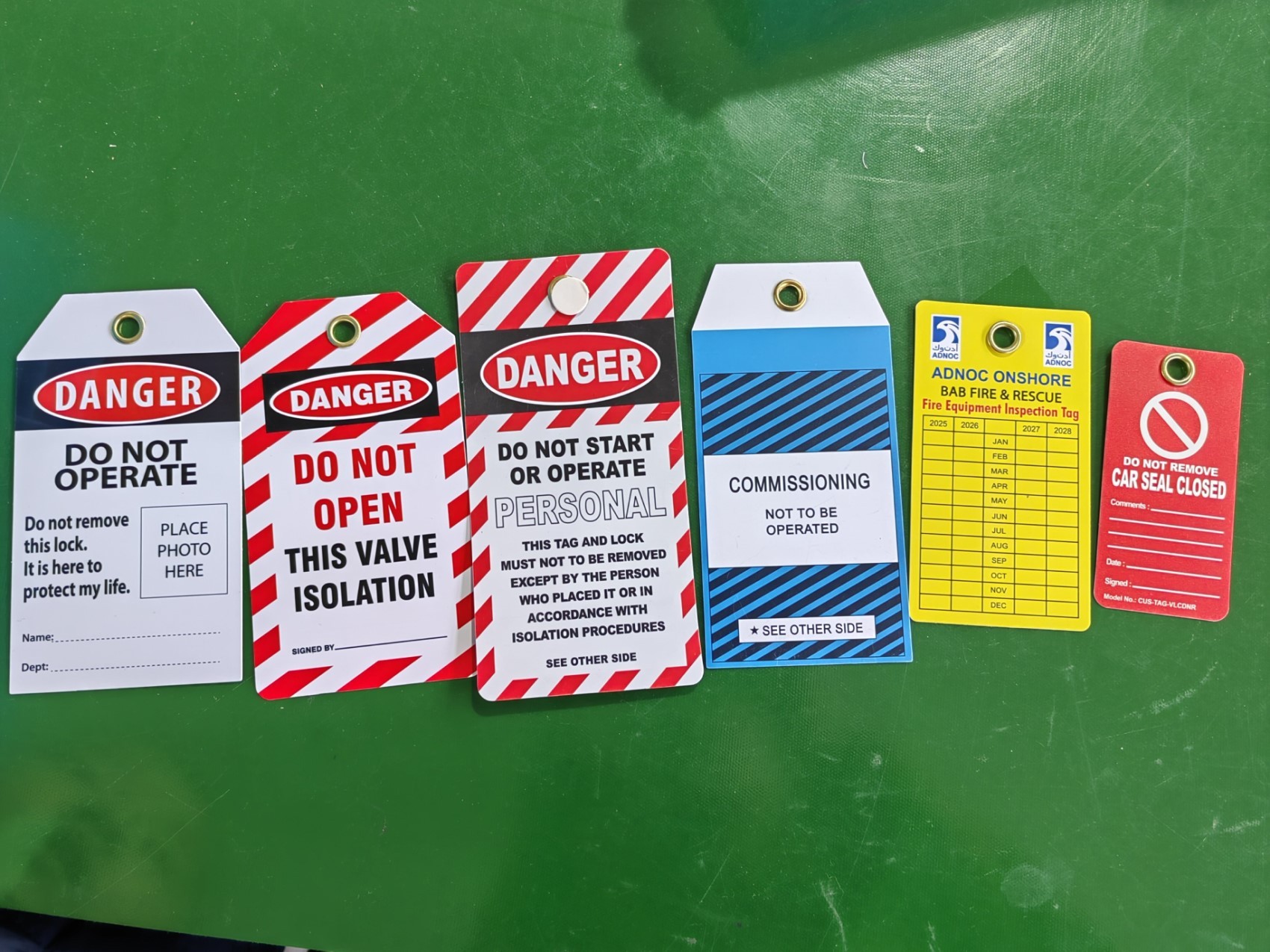
Avoid solutions that require manual photo printing and taping—these defeat the purpose and create compliance risks.
Common Mistakes That Undermine Photo Tag Effectiveness
Even with the best system, poor implementation can nullify benefits. Watch for these pitfalls:
1. Using Outdated or Incorrect Photos An employee’s tag shows a 10-year-old image. New hires don’t recognize the person. Update photos during annual safety training or badge renewal.
2. Poor Photo Quality Blurry, low-resolution, or dark images defeat the purpose. Ensure lighting and camera specs are adequate at print stations.
3. Lack of Policy Enforcement If supervisors don’t require photo tags or allow exceptions, the system erodes quickly. Treat photo tagging like PPE—non-negotiable.
4. Ignoring Privacy Concerns Some workers resist photo use due to privacy. Address this upfront: clarify that photos are used solely for safety, stored securely, and never shared externally.
5. No Backup for System Failure If the photo printer breaks, have a temporary protocol—like logging photo IDs in a digital logbook—so work isn’t delayed or compromised.
The Future: Smart Tags with Live Verification
The next evolution goes beyond static photos. Emerging systems use: - Live photo verification via mobile apps before lock application - Biometric validation (e.g., facial recognition) to confirm identity - Blockchain-style logs for tamper-proof audit trails
One pilot program at a semiconductor fab uses AR glasses: technicians scan a machine, confirm their identity via facial recognition, and the system prints a tag with their live photo and encrypted lock ID. The entire process takes 45 seconds and eliminates spoofing.
While not yet mainstream, these technologies signal a shift toward zero-trust safety models, where every action is authenticated and traceable.
Making the Shift: How to Implement Photo LOTO Tags
- Start with a pilot:
- Select 2–3 high-risk machines (e.g., press, boiler, conveyor)
- Equip a lockout station with a tablet and tag printer
- Train authorized employees on photo capture and system use
- Run a 30-day trial, collect feedback
- Measure outcomes: reduction in tag errors, audit pass rates, incident reports
Scale gradually. Integrate with existing LOTO training. Update your energy control program to include photo tag requirements.
Pro Tip: Pair photo tags with color-coded locks by department. A photo plus color creates instant visual hierarchy—critical in emergencies.
Final Thoughts: Safety Isn’t Just Compliance—It’s Clarity
Lockout tagout tags with photo aren’t about adding steps. They’re about removing doubt. In an environment where a split-second decision can lead to catastrophe, knowing exactly who locked a machine—and seeing their face—changes behavior.
This isn’t bureaucracy. It’s responsibility made visible.
If your LOTO program still relies on handwriting and memory, it’s time to upgrade. Start small, but start now. Because the next person who looks at a lockout tag shouldn’t have to guess who’s behind it.
Frequently Asked Questions
Why are photos important on lockout tags? Photos provide verifiable identity, reduce unauthorized lock removal, and improve accountability during maintenance.
Can we use existing employee ID photos for LOTO tags? Yes, if the images are clear, recent, and integrated into your LOTO system. Many platforms pull directly from HR databases.
Are photo lockout tags required by OSHA? No, but OSHA requires identification of the authorized employee. Photos are a highly effective way to meet that requirement.
What if a worker refuses to have their photo on a tag? Address privacy concerns transparently. Offer alternatives only if they maintain accountability—e.g., digital logs with photo verification.
How durable are printed photo tags? High-quality polyester or vinyl tags with UV-resistant ink can last years in harsh environments.
Can photo tags be used in digital-only LOTO systems? Yes. Many digital platforms display the worker’s photo on tablets or dashboards, even if the physical tag doesn’t include it.
Do photo tags replace lockout training? No. They enhance trained behavior but don’t substitute for proper LOTO education and authorization.
FAQ
What should you look for in Lockout Tagout Tags with Photo: Why Visual Accountability Matters? Focus on relevance, practical value, and how well the solution matches real user intent.
Is Lockout Tagout Tags with Photo: Why Visual Accountability Matters suitable for beginners? That depends on the workflow, but a clear step-by-step approach usually makes it easier to start.
How do you compare options around Lockout Tagout Tags with Photo: Why Visual Accountability Matters? Compare features, trust signals, limitations, pricing, and ease of implementation.
What mistakes should you avoid? Avoid generic choices, weak validation, and decisions based only on marketing claims.
What is the next best step? Shortlist the most relevant options, validate them quickly, and refine from real-world results.